Thursday, 8 December 2011

QR Barcodes


QR code (Quick Response code) is a type of two-dimensional barcode that can be read using a QR barcode reader or a camera enabled Smartphone with QR reader software (e.g. – QR Droid).
This technology was created by Toyota subsidiary Denso Wave in 1994 to track vehicles during the manufacturing process. It was designed to allow its contents to be decoded at a high speed thus making it a quick response code. The use of QR codes is free of any license. They can store up to 4296 characters and they are internationally standardised under ISO 1800
QR Codes can be used to display text, open a web address, send a text message, add contacts, call a telephone number, display product information etc. The use of a QR code can greatly increase your advertising space as they possess the ability to link to a webpage of indeterminate size. You can attract more people to read a magazine, for example, by printing a QR code on the front cover that, when scanned, displays important aspects of the magazine that would ordinarily not fit on a traditional front cover.
A QR code could be used to enhance your marketing campaign in a number of ways such as:
·         Printing a QR barcode on your promotional t-shirts with a link to your contact details or Facebook and Twitter accounts
·         Placing a QR barcode next to every product in your catalogue to display all the hidden information about the product
·         Printing a QR code linking to your website on promotional material such as flyers or magazines
·         Placing a QR code on your website containing information about any events, special offers or competition details
Below are few examples of QR barcodes, to scan them you will need a barcode reader software which is available for free on most of the Smart phones like “QR Droid” on Android phones and “Red Laser” on iphone


This QR Barcode will ring a specified number


This QR Barcode opens NMBS tech club blog on your Smartphone


The QR Code also contains its own error correction data, internal orientation calibration and self-alignment markers. Therefore it does not matter whether the QR code is upside down or wrapped around a curved surface, the message will still get through. Currently most of the businesses use linear Bar codes which can only hold up to 20 numerical digits, whereas QR codes are two-dimensional (2D) matrix barcodes that can hold thousands of alphanumeric characters of information. Their ability to hold more information and their ease of use makes them practical for small businesses. 
You can create QR barcodes here.


References

Near Field Communication (NFC): What does it mean for me?


What is Near Field Communication (NFC) and will the electronic wallet (smart phone) replace our current credit cards, rail tickets, and business cards?

According to the NFC Forum NFC “is a standards-based, short-range wireless connectivity technology that enables simple and safe two-way interactions among electronic devices” (NFC Forum, 2011).

NFC traces its roots back to Radio-Frequency Identification (RFID), which allows a reader to send radio waves to a passive electronic tag for identification and tracking, with the first RFID patent in 1983 (Wikipedia 2011). But it was in 2004 when Japan introduced ‘The Digital Wallet Services’, which are virtual versions of your credit or debit cards. It was this that brought NFC into the main stream for smart phone manufacturers.  Developing this theme mobile network operator NTT Docomo, (Japan's Osaifu-Keitai mobile wallet service), has confirmed that it will make the move to NFC standard technology from "around the end of 2012", in partnership with Korea's KT (mobile network operator). Thus: "Customers travelling between South Korea and Japan will access the services using compatible Android handsets embedded with contactless IC chips”

NFC Features:
       Operating at 13.56 MHz
       Transferring data at up to 424 Kbits/second
       Two way communication (“read” and “write”)
       Designed for short distance wireless communication
       NFC works in dirty environment
       NFC does not require line of sight
       Easy and simple connection (tap to start)
       Provides communication method
to non-self powered devices

NFC works using magnetic induction (Air-core transformer): a reader emits a small electric current, which creates a magnetic field that, in turn bridges the physical space between the devices. That field is received by a similar coil in the client device, where it is turned back into electrical impulses to communicate data such as identification number, status information, or any other information. So-called 'passive' NFC tags use the energy from the reader to encode their response, while 'active' or 'peer-to-peer' tags have their own power source and respond to the reader using their own electromagnetic fields (Braue 2011)

NFC has three modes of operation:
1) Card Emulation Mode (Secure)
  • Contact-less mobile payments (The electronic wallet)
2) Peer to Peer Communication Mode
  • Synchronise calendar
  • Share/transfer content (e.g. business cards)
  • Easy network setup & configuration
  • Smart key for automotive industry
3) Reader Mode
  • Tickets (per paid), cinema, theatre, train, etc.
(Jackson 2011)

The future market for NFC looks very bright. Jupiter Research projected that up to 700 million NFC-enabled mobile phones will be sold by 2013, and mobile payments will exceed $30bn by 2012 (Jupiter 2009). It will not be in the too distant future that a NFC enabled device will be in your pocket.

References

Jupiter 2009 – Research mobile device sales <online> http://www.forrester.com/rb/research/

NFC Forum 2011 – Definition <online> http://www.nfc-forum.org/home/
Jackson 2011 – NFC, Wolverhampton University 2011

Wikipedia 2011 – NFC History <online> http://en.wikipedia.org/wiki/Near_field_communication#History

Braue 2011 - Inside NFC: how near field communication works <online> http://apcmag.com/inside-nfc-how-near-field-communication-works.htm

Mozilla merges with Microsoft


As unusual a partnership as it may seem, Microsoft is now promoting ‘Firefox with Bing’, a collaboration of Internet Browser Firefox with Microsoft’s search engine Bing.

The default search engine for Firefox has, up until now, has been Google, although consumers were able to change this if they wished. Now an alternative version of Firefox is available with Bing as the default search engine. The new ‘Firefox with Bing’ supports all of the themes, extensions and additions that are compatible with Version 7 of the Firefox browser.

Firefox was launched seven years ago and has reached its current standing primarily with Google’s aid. Google has powered Firefox’s search function and provided funds to keep the organisation running, so is this collaboration with Bing the right decision for Mozilla?
An agreement made between Mozilla and Google in 2004 caused Google to be responsible for as much as 91 percent of Mozilla’s revenue, as Mozilla received a percentage of the money produced by Google searches within Firefox. This agreement is set to expire this year and, although there is no apparent reason why Google would not renew the previous agreement, the merge with Microsoft gives Mozilla a solid ‘Plan B’.

Another theory behind the Mozilla Microsoft merge is the rise of Google Chrome, which Google released after their 2004 agreement with Mozilla. Google can now been identified as a serious competitor to Mozilla with Google Chrome shares rising from 9.57 percent in November 2010 to 16.2 percent in September 2011. Microsoft also had a 31 percent search share through Yahoo US in September 2011 according to Comscore.

If the agreement between Mozilla and Google ceases at the end of the year then Google may lose a lot of users from the Mozilla Microsoft merge, as Google currently obtains a large number of its search requests from Firefox. Firefox is a popular browser and many users may remain with the browser despite the change in default search engine. If Google does decide to end the agreement it could dramatically alter the internet and create a huge dent in Google’s search dominance. Google would lose millions in advertising revenue whereas Microsoft would be sitting pretty, reaping search revenue from both Internet Explorer and Firefox, the No. 1 and No. 2 Web browsers. 

References
http://betanews.com/2011/10/27/hate-google-try-firefox-with-bing/
http://www.geek.com/articles/news/firefox-and-bing-officially-get-cozy-20111026/
http://imjustcreative.com/wp-content/uploads/microsoft-bing-logo-design.jpg
http://news.cnet.com/i/tim/2011/01/17/logo-only_270x270.png

Free Mobile Apps!


Within hours you could be distributing your first free company mobile application. App-Inventor is one such development tool that will assist you in achieving this goal. To get you started Google have provided a number free of online tutorials (Google-Tutorials 2011), they also include a downloadable emulator so that you do not need to own an Android smart phone to start developing today.  Accessing your smart phone’s sensors (GPS/Tilt/Touch screen/Text-to-speech/etc) has never been so simple.  App building is not limited to simple games, you can also build apps that inform and educate your own staff, existing customers and potential new customers. To use App-Inventor, you do not need to be a professional developer, because instead of writing code, you visually design the way the App looks and use blocks (block editor) to specify the App's behavior.

App-Inventor is simple to use, but also very powerful. The block development method  permits back end database connectivity and use without the need for specialist script writing, and because App Inventor provides access to a GPS-location sensor, you can build Apps that know where you are, or guide you to a location.  App-Inventor also provides a way for you to communicate directly with the web or specific web sites. 

What Google have to say: “In creating App Inventor for Android, we're fortunate to be able to draw upon significant prior research in educational computing, and work done in Google on online development environments.   The educational perspective that motivates App-Inventor holds that programming can be a vehicle for engaging powerful ideas through active learning. As such, it is part of an ongoing movement in computers and education that began with the work of Seymour Papert and the MIT Logo Group in the 1960s” (Google 2011)
An alternative to App-Inventor is Eclipse (Eclipse 2011).  A tutorial for developing an Android application using Eclipse can be found on the Vogella website (Vogella 2011)

Please Note: Google will end support for App-Inventor on 31st December 2011, it is making the source code publicly available under an open source license. In order to ensure the future success of App-Inventor, Google has funded the establishment of a Center For Mobile Learning at the MIT Media Lab. Public access similar to that which is currently offered will be available in the first quarter of 2012 (MIT 2011)

References
Google 2011, App-Inventor <online> http://www.appinventorbeta.com/about/moreinfo/
Google-Tutorials 2011, App-Inventor <online> Http://www.appinventorbeta.com/learn/tutorials/index.html
Eclipse 2011, Eclipse <online> http://www.eclipse.org
MIT 2011, Mobile Learning <online> http://mobilelearning.mit.edu
http://www.talkandroid.com/wp-content/uploads/2011/08/Google-App-inventor.png?54b313

NMBS and Electronic Trade


As 2011 draws to a close NMBS continue to lead the way with electronic trade solutions for both members and suppliers. We are now consistently receiving 92% of our electronic transactions via our EDI options, TRADACOMS, XML or Webforms. This equates to over 94,851 transactions received per month via electronic methods.
NMBS are continually working to increase this figure so that we eventually achieve our goal of 100% EDI transactions received.

However the work does not stop there, we are also offering solutions to our members to increase the volume of electronic transactions we send to them. The first solution is to send all EDI received transactions via XML to the member. This process allows the merchant to directly import all electronic transactions from NMBS into their back office system (providing it is setup to accept XML). It saves on processing the documents as the system should automatically do it for them and match them to purchase orders. The other solution is the Document Retrieval System, this sends out a daily email to members when they have invoices or credits to collect, within the email is a link which takes the user to all the outstanding invoices and credits that are on the Document Retrieval System. The user can then download all the documents (both electronically received documents and scanned paper documents) into one PDF, which they can either print or save to their PC. This system is secure and safe as it requires the user to logon before viewing the documentation, the documents are always available and can be downloaded as many times as required.

Both the above systems have contributed to NMBS trading over 57.22% of documents with members in an electronic format. For more information on the Document Retrieval System please click here or contact Sue Oliff on 0116 2614907 or email: sue.Oliff@nmbs.co.uk

For more information about trading electronically with NMBS, please click here or contact Sue Oliff on 0116 2614907 or email: sue.Oliff@nmbs.co.uk

Blackberry Outage

Unless you have been living under a rock for the past few months you will be aware that both BT and Blackberry have had problems with service – more notably Blackberry users losing the ability to browse the net as well as being unable to send and receive emails for 3 days.

For Blackberry the problem was a failure of a “core switch” at their hosting centre in Slough, this resulted in the worst downtime ever for Research in Motion (RIM), the company behind Blackberry. The outage, which lasted 3 days, saw users not being able to access a majority of the services which they rely on the Blackberry for – mainly sending and receiving emails when not in the office or at home. For a company of Blackberry’s size, there are expectations, such as constant uptime and guaranteed levels of service. Now with modern technology we expect that there could be some downtime, but limited to a few minutes or an hour at most… not 3 days! The problem couldn’t have come at a worse time for Blackberry, with fierce competition in the smartphone market from both Apple and Android handsets. The outage caused many people who relied on constant access to emails to look elsewhere.

What both the Blackberry and the BT problems highlight are the need not only for redundant systems but also the need to test them. Now granted this is not always as easy as it sounds, but there should always be a ‘Plan B’, some way of getting systems up and running in the event of a major problem or a disaster recovery situation.

References
http://www.blackberrycool.com/wp-content/uploads/2009/10/blackberry-bold-9700-official.jpg

How Apple have changed the world


apple2.jpg  apple3.jpg  
On the 1st of April 1976 Steve Wozniak, Steve Jobs and Ron Wayne founded Apple Computer Company, Inc., which would later become Apple Inc. The company was started due to Wozniak’s idea to upgrade the video terminal he built earlier into a complete computer. As a consequence in May 1976 Apple I was out in the market followed by Apple II eleven months later and Apple III in 1980.[1], [2], [3]
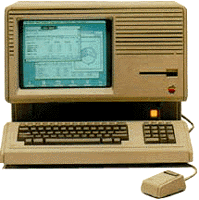
Lisa – 1983
The Company was developing, and attracted the attention of Xerox, who invested $1 million into Apple, and for a limited period of time gave them access to PARC (Palo Alto Research Center). In 1983 Apple released a computer with a Graphic User Interface (GUI) called Apple Lisa, based on the GUI research carried in PARC.[4]

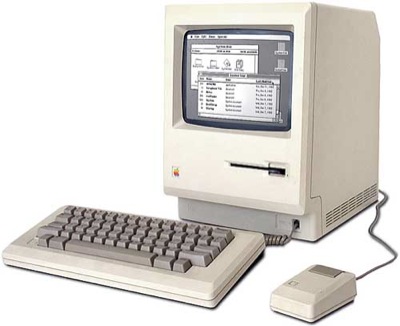
Macintosh 128k – 1984  
In 1984 the company released Macintosh 128k which was considered the first affordable computer. It had a black and white monitor and floppy disk drive with a 8 MHz Motorola 68000 processor.[5]

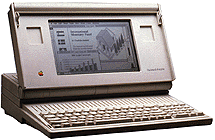
Macintosh Portable – 1989
The Mac Portable, released in 1989, was an attempt to reduce the size of Apple’s computers and produce a more mobile device. However the active matrix screen, made later as a backlit, increased the cost of the already expensive machine.[6]

iMac – 1998
The iMac was designed in 1998 with the Internet in mind, hence the ‘i’ in iMac. It was enclosed in a stylish case and was meant to target the lower end customers. Equipped with an internal 56Kpbs modem and USB mouse and keyboard, this machine was considered the computer of the millennium.[7], [8]

iBook – 1999
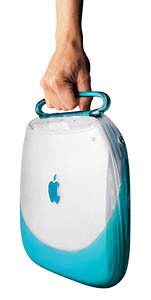
The iBook - PowerPC consumer laptop was perhaps the most highly anticipated Apple computer ever. Aiming at the same market as the iMac it provides unique design combined with a stylish handle making it easy to carry. The most exclusive feature of the iBook is the AirPort- wireless networking system. In 2006 the iBook was replaced by the MacBook.[9]

 
Mac OS X – 2001
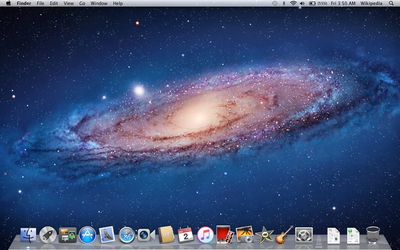
According to the Apple press Info: “Mac OS X is the world’s most advanced operating system, combining the power and openness of UNIX with the legendary ease of use and broad applications base of Macintosh.”   

The Mac OS X operating system became the main commercial alternative to Windows OS. The subsequent versions are named after “big cats” with the latest one to be “Lion”.[10]

 
iPod – October 2001
With the release of the iPod in 2001 Apple entered the world music market allowing their customers to keep most, if not all, of their music collection in their pocket. Steve Jobs announced: “With iPod, listening to music will never be the same again” and certainly it is not.[11]

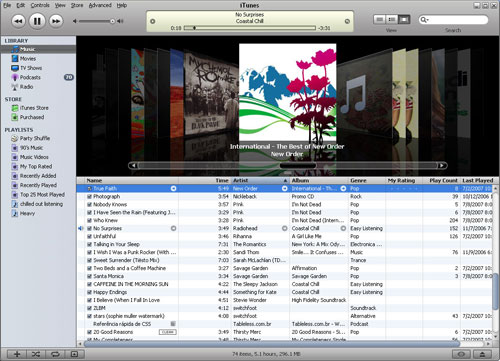
iTunes store – April 28, 2003
In 2003 Apple launched the iTunes store where music from a large variety of artists can be bought and downloaded in an instant, giving limited right of distribution on a number of Apple products. This allows customers access to their favorite songs on a number of devices, without violating the copyright holders (i.e. producers, artists, composers, etc.) rights.

Mac Pro – August 7, 2006
There are two very important things about this machine: the year it was built 2006 and its specification, for such a high spec machine to be available at this time was fantastic. Even now 5 years on this is a fairly high spec machine. Below is a brief description of what is in the box of this super powerful computer:
·         64-bit desktop workstation
·         Two Dual-Core Intel Xeon 3.0 GHz processors
·         1GB of 667 MHz DDR2 (expandable up to 16GB!);
·         NVIDIA GeForce 7300GT with 256MB GDDR2 SDRAM
·         or ATI Radeon X1900XT with 512MB of GDDR3 SDRAM
·         or NVIDIA Quadro FX4500 with 512MB of GDDR3 SDRAM
·         250GB SATA 7200rpm expandable up to four 500GB (or 2TB in total!)[13]

iPhone & iOS – January  9, 2007
The world of mobile phones was revolutionized with the development of the iPhone. The device integrates a mobile phone, a widescreen iPod, a device to browse the Internet, send emails, search the web and use maps. The iPhone introduced a new way of interaction using your fingers. All this is possible through the carefully designed mobile operating system iOS.[14]

 
MacBook Air – January 30, 2008
With 0.16-inches at its thinnest point and a maximum height of 0.76-inches the MacBook Air is considered as “The World’s Thinnest Notebook”. The small size however does not compromise the functionality, usability or the power of the device. It has a full size keyboard, large track pad supporting multi-touch gestures, a 1.6 GHz or 1.8 GHz Intel Core 2 Duo processor, 2GB memory, 80GB 1.8-inch hard drive and an optional 64GB solid state hard disk.[15]

iPad – January 27, 2010
The iPad is not simply just a larger version of the iPhone, as some thought when it was first announced, it is an answer to the demand for a more mobile, powerful and easy to use device. It has an increased functionality and can be used for a number of applications such as; browsing, reading, emails, watching videos, listening to music and much more with specially designed Apps.
Perhaps the best description of the iPad is the one made by Steve Jobs:
“iPad is our most advanced technology in a magical and revolutionary device at an unbelievable price, iPad creates and defines an entirely new category of devices that will connect users with their apps and content in a much more intimate, intuitive and fun way than ever before.”[16]
This article does not aim to give a full product history of the Apple Inc company. In fact innovations such as the App Store, MacMini, iCloud and many of the devices and achievements in-between the products mentioned above have been deliberately omitted. The main aim is to try to show how Apple and in particular Steve Jobs, who recently passed away, have revolutionized our world in terms of how we communicate and share information, how we live, how we are and perhaps even the way we think. If those devices had never been created our history would be very different. 


References:
Images in the header from left to right:
Other images: