Tuesday, 26 June 2012

The Digital Paper

  
For many years, many manufacturers of handheld technology have suggested we are witnessing the death of the book. E Ink (electrophoretic ink) manufactured by E Ink Corporation, founded in 1997, was a major step forward in providing a very slim display that is commercially available in both grayscale and colour and is commonly used in mobile devices such as e-readers and to a lesser extent, mobile phones and watches. However, users expectations were higher. There was a demand for touch screens, larger displays and wireless connectivity. The Skiff Reader was unveiled (New York 2010); claimed to be “largest e-paper display, thinnest e-reading device, most durable e-reader, highest display resolution, full touch screen, and extraordinary battery life”  

Features
  • 228.6 mm by 279.4 mm by 6.8 mm
  • 498 grams
  • 11.5 inches display resolution, 1200 x 1600 pixels at 174 ppi, e-Paper display silicon thin-film-transistors (TFT) on flexible stainless-steel substrate (no glass and flexible)
  • shatter-proof, crack-proof, touch-screen supports both finger and stylus operation
  • 3G-enabled, wifi-enabled, USB 2.0 over standard mini-USB port, internal memory 4 GB with SDHC 2.0 standard compliant SD-card slot, built-in speaker and 3.5 mm standard audio jack
  • Battery life - one week between charges.

HTML5

HTML5 is a mark up language used for developing websites/applications. It is the fith revision of the HTML standard and is being developed as a collaboration between the World Wide Web Consortium (W3C – the organisation that maintains web standards) and the Web Hypertext Application Technology Working Group (WHATWG).

Since 1999 and the introduction of the previous version, HTML4.01, the web has changed considerably and HTML5 will address these changes.  According to the W3Schools website1 certain rules for HTML5 were established as outlined below:
  • New features should be based on HTML, CSS, DOM, and JavaScript
  • Reduce the need for external plugins (like Flash)
  • Better error handling
  • More markup to replace scripting
  • HTML5 should be device independent
  • The development process should be visible to the public
HTML5 will include a number new features to enhance or replace those found in HTML4.01. These new features include2:
  • The <canvas> element for 2D drawing
  • The <video> and <audio> elements for media playback
  • Support for local storage
  • New content-specific elements, like <article>, <footer>, <header>, <nav>, <section>
  • New form controls, like calendar, date, time, email, url, search
HTML5 is currently being used by a number of companies around the world, although as yet it is not an official standard and no browsers will have full HTML5 support. W3C has said that it is developing a comprehensive test suite to achieve broad interoperability for HTML5’s full specification by 20143. 

Following figure shows the different APIs and DOMs related to HTML5.


Click here to view samples of websites designed completely using HTML5. According to Binvision.com 34 percent of the 100 most popular websites use HTML5, with leading search engines and Social Media Sites topping the list. 

How can developing in HTML5 help your business?

A website, or webpage that is developed using HTML5 can be viewed easily through many different platforms, eradicating the need to create separate versions for Windows, Mac, Apple iOS, Android, RIM Blackberry etc. This, coupled with their ability to be easily maintained, will reduce both the time and cost involved with website development and maintenance.
The new features of HTML5 will allow users to create websites that are both more appealing and simpler to navigate for members. This combination should help to attract more visitors to your website or App.
The free W3 Schools tutorials offer an excellent opportunity to begin learning HTML5 and can be accessed here.

Gadget Show Live 2012

On Tuesday 10th April 2012, NMBS attended the UK’s biggest five-day consumer electronics event showcasing the world’s latest tech held at the NEC Birmingham. The event was host to over  125,000 gadget lovers and over 280 technology exhibitors.


Similar to the previous year’s event the show was split into individual areas known as ‘tech zones’ including: Future Tech Zone, Home Gadget Zone, UK Inventor Village, Photographic Zone, and Hall of Fame. There was also the ‘Showcase Stage’ which featured acts and stunts from all five of the TV show presenters.  Checkout highlights from this year’s show floor by following this link.

The Expo itself took over seven of the NEC’s main halls, hosting exhibitor’s booths from such walks of life as the sporting world, entertainment industry and the building trade, all wanting to show off their latest gadgets in their respected fields.


There was a lot to see and experience at this year’s Gadget Show Live with one of the highlights being ‘The Centre for Computing History Museum’. On display were mock-up living rooms each incorporating tech from the 70s, 80s, 90s and now the 00s.  It certainly highlights the speed at which we are advancing in the development of technology and makes you wonder where we will be in another 40 years.


Another interesting piece on display was the SmartBird, designed and constructed by Festo.  The SmartBird mimics both the look and movement of a real herring gull, to such extent that it is difficult to distinguish between the two when in flight.

However the most impressive item on display for me was a great App called Aurasma Lite. Aurasma is an augmented reality platform created by the Autonomy Corporation, currently available as a free download from either iTunes for Apple or Play Store for Android, Aurasma Lite is available for iPhone 4, iPhone 4S, iPad 2, iPad3 and higher end Android devices. It uses the device's video camera to recognise and understand pre-trained images, symbols and objects in the real world.  It can then deliver digital content in real time as an overlay, including videos, animations, audio or web pages. 


If you see this icon on any image it means that it is compatible with Aurasma Lite and you will be able to access extra content.  


Download Aurasma Lite and try the app with the following two images.


However the majority of items on display did not use new technology, but rather updated versions from the previous year. Many of the displays were similar, giving the illusion of a giant electrical store.

Although more exhibitors were in attendance, some of the bigger companies had either down sized their booths from previous years or had chosen to not attend at all. One explanation for this may relate to the recently announced Gadget Show Christmas being held at the Excel Centre in London between 30th November and 2nd December.  Explaining why Nintendo chose to be absent this year, choosing rather to delay demoing their new games console, the Wii U, until later in the year, just in time for its release date around the festive season.

Jamie Freer
Information Systems Officer
NMBS Ltd

Monday, 12 December 2011

Top Ten Gadgets for Christmas 2011


10 Commodore 64x PC

Commodore 64 Lives again!

It's back... and better than ever! The new Commodore 64 is a modern functional PC as close to the original in design as humanly possible. It houses a modern mini-ITX PC motherboard which comes in two configurations. The C64x Ultimate (C64x-UL) has a Dual Core 525 Atom processor and an nVidia ION2 graphics chipset, with the flagship model, the C64x Extreme (C64x-EX) which comes with a second generation Intel Sandybridge Core i7 capable of reaching speeds of 3.3Ghz. The new Commodore 64 comes in the original's taupe brown/beige colour, with other colours to follow.

The new Commodore 64 is a fully functional PC, so you can even install and use the latest versions of Windows and with a graphical boot menu at start up from which Windows can be selected to run, you needn't lose any of the functionality of the new C64's included operating systems. Commodore OS Vision comes with the WINE compatibility layer pre-installed which is capable of running selected Windows software. VirtualBox is also included with Commodore OS Vision, allowing you to install Windows and run Windows software in a seamless mode.

Click here for more information about the Commodore 64x PC

RRP $999.00 (C64x Ultimate) / $1499.00 (C64x Extreme)

09  SensoGlove

SensoGlove is the first and only golf glove with built-in sensors that constantly read the pressure of your grip. Practicing with SensoGlove will teach you the correct grip pressure for a smooth, consistent swing that delivers greater distance, enhanced precision and lower scores!

Maintaining a lighter grip pressure is regularly discussed in every golf magazine and by all the professional golfers and teaching pros. The trouble is that it is difficult to learn exactly what they mean by a light grip pressure and most golfers end up swinging with a death grip.

SensoGlove’s built-in digital computer actively monitors your grip with sensors placed strategically throughout the glove, providing instant feedback at all the points of your swing. SensoGlove’s audio feedback warns you at the moment your grip becomes too tight, allowing you to learn and maintain correct grip pressure at every point of your swing.

Everything about your swing is affected by the way you hold the club! SensoGlove will teach you the best grip for every part of your game!

Click here for more information about the SensoGlove

     RRP £50.64
08   Huawei E586 Wireless Modem 

With its wireless interface, the E586 connects you to all Wi-Fi devices, creating your personal
Wi-Fi zone! Carry it in your pocket, and you can stay online anytime and anywhere, through any Wi-Fi device, mobile phone, PSP, digital camera, notebook, PDA etc. You will experience high-speed surfing and steady connection, characteristics of a true 3G era! Better user experiences include:

Intelligent power control
Temperature protection
Web messages
Web SD card info sharing
Small screen page setting
Screen display of statuses

Click here for more information about the Huawei E586 Wireless Modem               From £10.87 a month

07  Skylanders: Spyro’s Adventure
(Video Game for Xbox 360, PS3 & PC)

One for the kids!
Skylanders are special action figures that come to life! Just take a Skylander, place it on the Portal of Power and BOOM! the Skylander will come to life in the video game.

It doesn't matter what gaming system your friends have at their house, the Skylanders work on and across all major video game systems. You can take your Skylanders over to your friend's house, drop them on their Portal of Power and your Skylanders will come to life in the game!

Click here for more information about Skylanders: Spyro’s Adventure (Video Game for Xbox 360, PS3 & PC)

      RRP £59.99
06   Amazon Kindle

Lose Yourself in Your Reading 
The most elegant feature of a physical book is that it disappears while you're reading. Immersed in the author's world and ideas, you don't notice a book's glue, the stitching, or ink. Amazon’s top design objective is to make Kindle disappear — just like a physical book — so you can get lost in your reading, not the technology.  

Ergonomic Design 
Kindle is easy to hold and read. It was designed with long-form reading in mind. When reading for long periods of time, people naturally shift positions and often like to read with one hand. Kindle's page-turning buttons are located on both sides, allowing you to read and turn pages from any position. The new soft-touch, textured back is comfortable to hold and never gets hot in your hands. 

Precise 5-Way Controller
Kindle has an easy-to-use 5-way controller, enabling precise on-screen navigation for selecting text to highlight or looking up words. No on-screen fingerprints. 

Never Gets Hot
Unlike a laptop, Kindle never gets hot so you can read comfortably as long as you like. 

Built-in Wi-Fi
Kindle automatically detects nearby Wi-Fi networks at school, home, or your favourite café. At a hotel or café that requires a password? Simply enter the password and connect to the network. Once you have added a Wi-Fi network, Kindle will automatically connect to that network the next time you’re near the hotspot. 

Click here for more information about the Amazon Kindle

RRP £89.00

05   Apple iPod Nano

The best things in life have a soundtrack, and that’s where iPod nano shines. The easy-to-use Multi-Touch display gives you total control of your music experience. Tap to play, or tap Music to browse your collection by songs, albums, artists, playlists, genres or composers. You can even customise your Home screens so your music is organised just how you like.

The built-in accelerometer in iPod nano gives you real-time feedback on your workout, and you can upload data to the Nike+ website. There’s no need to connect a receiver or use a shoe sensor to track your steps, distance, pace and time. Just clip on iPod nano and go. In the gym, connect iPod nano to a Nike + iPod–compatible cardio machine to keep track of every workout. Back at your computer, upload all your data to the Nike+ website to create personal goals, check your progress and challenge your friends to top your results.

Click here for more information about the Apple iPod Nano                       RRP £115.00 (8GB) / £129.99 (16GB)

04   Samsung Multi-view MV800
 
The Flip-out Display - Life, from all angles
Easily capture your unique perspective. The MV800’s 3.0" Display flips up and down so you can frame shots at any angle without having to twist your body or bend your back. Snap a high-angle shot over a crowd to effortlessly capture a street performance, or get waist-level candid’s of your dog. Take low angle shots without getting on the ground, or spin the display all the way around for dazzling self-portraits. The LCD lets you stand the camera so everyone can enjoy from a comfortable position. Life’s more fun when you can cover all the angles. 

Click here for more information about the Samsung Multi-view MV800
               RRP £249.99


03   Microsoft Kinect for Xbox 360

Something For Everyone
Whether you're a gamer or not, anyone can play and have a blast. And with advanced parental controls and movies for the family, Kinect promises a gaming experience that's safe, secure and fun for everyone.
Full Body Gaming
Controller-free gaming means full body play. Kinect responds to how you move. So if you have to kick, then kick. If you have to jump, then jump. You already know how to play. All you have to do now is to get off the couch.
Use Your Voice
Kinect uses advanced entertainment technology to respond to the sound of your voice. Just say "Xbox" to reveal a series of voice commands. So you'll be able to control HD movies with the sound of your voice—no remote required.
It’s All About You
Once you wave your hand to activate the sensor, your Kinect will be able to recognize you and access your Avatar. Then you'll be able to jump in and out of different games, and show off and share your moves.

Click here for more information about the Microsoft Kinect for Xbox 360

               RRP £129
02   ASUS EEE Pad Transformer TF101

Transform to notebook mode with keyboard docking station and 16*1 hours of battery life.

The Transformer sets itself apart from other tablets on the market by featuring an optional docking station. This provides access to a full QWERTY keyboard along with unique Android Function keys, turning the tablet Transformer into a full-fledged notebook.

A touchpad, 3.5mm audio jack, two USB ports as well as a built-in SD Card reader for easy file sharing and storage expandability makes the Transformer a versatile media hub. The docking station also extends the Transformer’s 9.5 hours* of battery life up to 16 hours*, so users can use it all day for work and play.

Click here for more information about the ASUS EEE Pad Transformer TF101
                       RRP £429.99

 
01   Samsung Galaxy S II

4.3" SUPER AMOLED Plus
The 4.3" SUPER AMOLED Plus display goes a step beyond the already remarkable SUPER AMOLED to provide enhanced readability, a slimmer design, and better battery consumption for the best viewing value of any Smartphone.
Dual Core Application Processor
Clocking at lightening speeds the performance of the Dual Core Application Processor provides functionality and density for fast browsing, quick multi-tasking, a smooth UI, snappy streaming and efficient gaming. With encoding/decoding ability that supports video play and recording, the Samsung GALAXY S II showcases outstanding power and performance.
8.49mm Slim Design
Taking slim to the next dimension. The Samsung GALAXY S II rides the leading edge with an ultra-slim 8.49mm form factor, a luxurious design and an easy grip. The ultra-slim smartphone also boasts 3D TouchWiz UX adds to the evolutionary experience with a futuristic user interface.

Click here for more information about the Samsung Galaxy S IIRRP                    £519.95 (SIM Free)

How Apple Have Changed The World


On the 1st of April 1976 Steve Wozniak, Steve Jobs and Ron Wayne founded Apple Computer Company, Inc., which would later become Apple Inc. The company was started due to Wozniak’s idea to upgrade the video terminal he built earlier into a complete computer. As a consequence in May 1976 Apple I was out in the market followed by Apple II eleven months later and Apple III in 1980.[1], [2], [3]


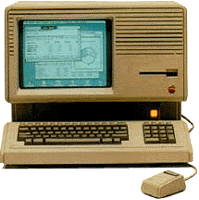
Lisa – 1983
The Company was developing, and attracted the attention of Xerox, who invested $1 million into Apple, and for a limited period of time gave them access to PARC (Palo Alto Research Center). In 1983 Apple released a computer with a Graphic User Interface (GUI) called Apple Lisa, based on the GUI research carried in PARC.[4]


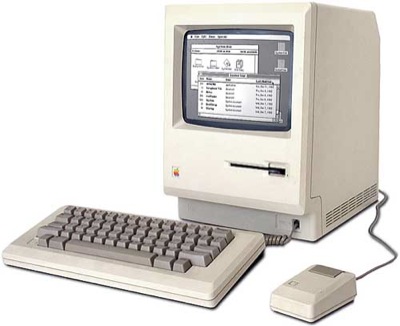
Macintosh 128k – 1984  
In 1984 the company released Macintosh 128k which was considered the first affordable computer. It had a black and white monitor and floppy disk drive with a 8 MHz Motorola 68000 processor.[5]


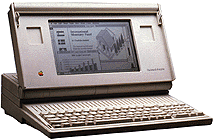
Macintosh Portable – 1989
The Mac Portable, released in 1989, was an attempt to reduce the size of Apple’s computers and produce a more mobile device. However the active matrix screen, made later as a backlit, increased the cost of the already expensive machine.[6]


iMac – 1998
The iMac was designed in 1998 with the Internet in mind, hence the ‘i’ in iMac. It was enclosed in a stylish case and was meant to target the lower end customers. Equipped with an internal 56Kpbs modem and USB mouse and keyboard, this machine was considered the computer of the millennium.[7], [8]


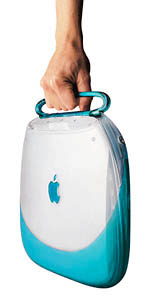
iBook – 1999
The iBook - PowerPC consumer laptop was perhaps the most highly anticipated Apple computer ever. Aiming at the same market as the iMac it provides unique design combined with a stylish handle making it easy to carry. The most exclusive feature of the iBook is the AirPort- wireless networking system. In 2006 the iBook was replaced by the MacBook.[9]


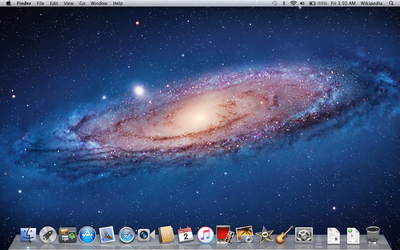
                                                      Mac OS X – 2001

According to the Apple press Info: “Mac OS X is the world’s most advanced operating system, combining the power and openness of UNIX with the legendary ease of use and broad applications base of Macintosh.”

The Mac OS X operating system became the main commercial alternative to Windows OS. The subsequent versions are named after “big cats” with the latest one to be “Lion”.[10]

 
iPod – October 2001
With the release of the iPod in 2001 Apple entered the world music market allowing their customers to keep most, if not all, of their music collection in their pocket. Steve Jobs announced: “With iPod, listening to music will never be the same again” and certainly it is not.[11]


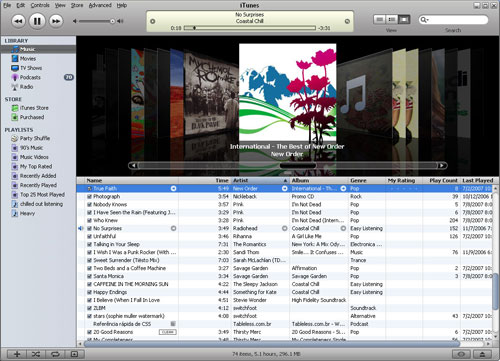
iTunes store – April 28, 2003
In 2003 Apple launched the iTunes store where music from a large variety of artists can be bought and downloaded in an instant, giving limited right of distribution on a number of Apple products. This allows customers access to their favorite songs on a number of devices, without violating the copyright holders (i.e. producers, artists, composers, etc.) rights.


Mac Pro – August 7, 2006
There are two very important things about this machine: the year it was built 2006 and its specification, for such a high spec machine to be available at this time was fantastic. Even now 5 years on this is a fairly high spec machine. Below is a brief description of what is in the box of this super powerful computer:
·         64-bit desktop workstation
·         Two Dual-Core Intel Xeon 3.0 GHz processors
·         1GB of 667 MHz DDR2 (expandable up to 16GB!);
·         NVIDIA GeForce 7300GT with 256MB GDDR2 SDRAM
·         or ATI Radeon X1900XT with 512MB of GDDR3 SDRAM
·         or NVIDIA Quadro FX4500 with 512MB of GDDR3 SDRAM
·         250GB SATA 7200rpm expandable up to four 500GB (or 2TB in total!)[13]


iPhone & iOS – January  9, 2007
The world of mobile phones was revolutionized with the development of the iPhone. The device integrates a mobile phone, a widescreen iPod, a device to browse the Internet, send emails, search the web and use maps. The iPhone introduced a new way of interaction using your fingers. All this is possible through the carefully designed mobile operating system iOS.[14]

MacBook Air – January 30, 2008
With 0.16-inches at its thinnest point and a maximum height of 0.76-inches the MacBook Air is considered as “The World’s Thinnest Notebook”. The small size however does not compromise the functionality, usability or the power of the device. It has a full size keyboard, large track pad supporting multi-touch gestures, a 1.6 GHz or 1.8 GHz Intel Core 2 Duo processor, 2GB memory, 80GB 1.8-inch hard drive and an optional 64GB solid state hard disk.[15]

iPad – January 27, 2010
The iPad is not simply just a larger version of the iPhone, as some thought when it was first announced, it is an answer to the demand for a more mobile, powerful and easy to use device. It has an increased functionality and can be used for a number of applications such as; browsing, reading, emails, watching videos, listening to music and much more with specially designed Apps.
Perhaps the best description of the iPad is the one made by Steve Jobs:
“iPad is our most advanced technology in a magical and revolutionary device at an unbelievable price, iPad creates and defines an entirely new category of devices that will connect users with their apps and content in a much more intimate, intuitive and fun way than ever before.”[16]

This article does not aim to give a full product history of the Apple Inc company. In fact innovations such as the App Store, MacMini, iCloud and many of the devices and achievements in-between the products mentioned above have been deliberately omitted. The main aim is to try to show how Apple and in particular Steve Jobs, who recently passed away, have revolutionized our world in terms of how we communicate and share information, how we live, how we are and perhaps even the way we think. If those devices had never been created our history would be very different. 


References:
Images in the header from left to right:
Other images:

Thursday, 8 December 2011

Windows 8 Beta - Key Features Preview


Windows 8
Due for release during the second half of 2012 the finished version of Windows 8 will be the latest version of the Microsoft operating system. 

This time around Microsoft has implemented many changes from the previous versions. In particular it adds a new Start Screen interface which has been designed for touchscreen input in addition to mouse, keyboard, and pen input.  It also supports an improved boot time and will hit the login screen in approximately 30 seconds.


Metro
Metro is the name given by Microsoft for their new user interface for Windows 8. It replaces the more traditional Windows desktop which, although still present, has been significantly toned done.  i.e. the standard start menu is no longer present. 

It is built around the tablet model, which is already in use for Microsoft’s Windows Phone 7 platform and is soon to be implemented into the Xbox 360 console as well.   It incorporates large buttons which represent your commonly used programs. 

Viewing  Installed Programs

Windows 8 no longer displays the traditional start menu, which means the process of viewing all non-Metro programs has changed.


You now have to hold down the Windows key and press F, which brings up the search dialog page. From here you can click on the Apps button and you'll be taken to a list of installed applications.  Just click one to launch it, or right-click one and select Pin to add it to the Metro screen for easier access later.


Running Apps and programs
In order to run an app or program, you can now press the Windows key and start typing the name of the item you wish to load. The search window will appear with list matching the details you entered in the search text box, clicking one will launch it.
Alternatively, you can hold down the Windows key and press R to open the Run box and enter the programs name. i.e. ‘eventvwr’.


Closing Applications Automatically
Although still present when running apps in desktop mode, Metro apps do not have the ‘Close’ button, which is an intentional move by Microsoft.
The reason being that in previous versions of Microsoft’s OS it has been the responsibility of the user to control all the programs you would like to run. Although you are able to run as many programs as you like the system would eventually begin to suffer and result in slower performance, as you run out of RAM and rely on the virtual ram as an alternative.
To solve this Windows 8 recognises when it is starting to run short of resources and will close down anything you've not used for a while. As the application's state is saved first, you do not need to be concerned with the loss of data as when re-launched the application will you'll take you back to where you left off.
Task switching
Due to the fact that the Metro interface does not display a taskbar, it is possible to lose track of the apps you have running. However, as with previous versions of Windows, you can press Alt+Tab to display a list of open apps. Additionally you can press Win+Tab to switch from one running app to the next.  If using a touch screen you can us you finger to swipe repeatedly from the left also cycles through running apps.
If you continue to press the Windows key on your keyboard you can switch between the Metro screen and the last app you were using.
Additionally if you move your mouse to the left edge of the screen a thumbnail of the last app you used will appear whereby you can open it.

Internet Explorer 10

Internet explorer has also had an overhaul both in the looks and power department.

There are now two different interfaces for you to use, the first being the new Metro design (right) and the standard version which appears just like IE9.

Although added functionality for general users is miner there is a long list for developers.  These include support for web workers, a technology that allows web applications to run complex JavaScript’s in the background. This means that lengthy tasks will not lock up your browser and the application's interface should still be able to respond to your clicks


Security for web applications has also been increased with added support for iframe isolation and the HTML5 sandbox, closing many security leaks. The support for CSS3 Positioned Floats allows developers to easily create print-like layouts, where text can flow smoothly around images or other objects. Elsewhere you'll find support for the HTML5 Parser, HTML5 Forms, channel messaging, Media Query Listeners and many more


Picture Password and Logging in
Another new addition is the creation of the picture password. This is where you can pick any type of image and then draw on it in a combination of taps, lines and circles. Only someone who can reproduce this pattern will be able to login.

Shutting Down
To shut down the PC from Metro, you can display the Settings menu by moving the mouse to the bottom left corner of the screen and clicking on settings, followed by the power icon, and finally shut down.
Or, if you are in the desktop view, you can press Alt+F4 and choose from Shut Down, Restart, Switch User or Log Off.

Versions and Download
These are just a few of the new features added to Windows 8 and, with approxamatlly 12 months of development still to run, it will be interesting to see what will have changed come the official release date.
If you would like to demo Windows 8 for yourself then there are currently three different versions for you to try.

The first and largest weighs in at 4.8GB and is a 64-bit edition which includes a set of developer tools such as a preview of Microsoft Visual Studio 11 Express and the SDK (software developer’s kit) for Metro-style applications.

The remaining two editions of Windows 8 are a 64-bit (3.6GB) and a 32-bit (2.8GB) version respectively.
All are available in an .iso file format that can be copied to a DVD or USB drive for installation purposes.

In order to run the preview, Microsoft recommends that you utilise a PC with 1GB of RAM (2GB for the 64-bit edition) and 16GB of hard drive space (20GB for 64-bit). Addinitionally when installing Windows 8, along with the developer’s tool, you will have to overwrite your PCs current operating system (XP, Vista or Windows 7) with a clean install. However if you are setting up the smaller sans-tools versions, you can install it while retaining the files, user accounts and settings on a Vista- or Windows 7-powered PC.
Please click here to download the Windows 8 Developer Preview of your choosing.